Foram encontradas 540 questões.
How To Assemble A Desktop PC/Assembly
From Wikibooks, the open-content textbooks collection
Now that you have selected your parts, you get to what is arguably the most fun part of the process: putting the parts together.
Tools and equipment
You won't need many tools to assemble your computer, in fact the only one you must have is the screwdriver and an anti-static wristband (very useful), but if you can get most of the following togcther, you'II find things a little e easier.
Basic tools
Before you begin buílding or refitting a computer, you will need some basic tools:
1. #2 Phillips-head (cross-shaped) screwdriver
2. Needlenose pliers
3. Anti-static Wrist Strap
4. A large level working space
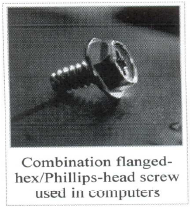
Optional, but useful tools
Some other tools and equipment can.come in handy as well, such as:
1. Spring action parts grabber.
2. Electrical tape
3. Wire or nylon ties
4. Flashlight, preferably hands-free
5. A second, working computer to swap parts, look for tips, ask for help online, download drivers and patches, etc. - very useful
6. A can of compressed air - useful when working with older parts that have collected dust. A better alternative but also more costly, is a vacuum cleaner designed for cleaning electronics.
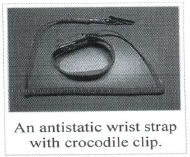
Preparation
Proper preparation is the key to a successful build. Before you begin, make sure you have all the tools you will need, secure a clear, well-lit workspace. Gather all the components you'II be using and unpack them one at a time. verifying that everything that is supposed to be there is actually present. At this point you should leave the parts themselves in their protective anti-static bags, and assemble all the accompanying manuals. Now I know you want to get started, but trust me, read the manuals, check the diagrams, make sure you understand where each part goes and how it attaches. if there is anything you don't understand, now is the time to do a little extra internet research or call the manufacturer with your questions.
Find a dry, well-ventilated place to do your work. You should have plenty of light and if possible, you should choose an area without carpet on the floor, as carpet tends to generate a lot of static. An unfurnished basement ia a good work lacation.
 Safety precautions are important for your own security. Please read the safety precautions thoroughly.
Safety precautions
http://en.wikibooks.org/wiki/How_To_Assemble_A_Desktop_PC/Assembly 18/6/2010
When working with dusty parts, an excellent tool to make them ready for use is.
Provas

How To Assemble A Desktop PC/Assembly
From Wikibooks, the open-content textbooks collection
Now that you have selected your parts, you get to what is arguably the most fun part of the process: putting the parts together.
Tools and equipment
You won't need many tools to assemble your computer, in fact the only one you must have is the screwdriver and an anti-static wristband (very useful), but if you can get most of the following togcther, you'II find things a little e easier.
Basic tools
Before you begin buílding or refitting a computer, you will need some basic tools:
1. #2 Phillips-head (cross-shaped) screwdriver
2. Needlenose pliers
3. Anti-static Wrist Strap
4. A large level working space
Optional, but useful tools
Some other tools and equipment can.come in handy as well, such as:
1. Spring action parts grabber.
2. Electrical tape
3. Wire or nylon ties
4. Flashlight, preferably hands-free
5. A second, working computer to swap parts, look for tips, ask for help online, download drivers and patches, etc. - very useful
6. A can of compressed air - useful when working with older parts that have collected dust. A better alternative but also more costly, is a vacuum cleaner designed for cleaning electronics.
Preparation
Proper preparation is the key to a successful build. Before you begin, make sure you have all the tools you will need, secure a clear, well-lit workspace. Gather all the components you'II be using and unpack them one at a time. verifying that everything that is supposed to be there is actually present. At this point you should leave the parts themselves in their protective anti-static bags, and assemble all the accompanying manuals. Now I know you want to get started, but trust me, read the manuals, check the diagrams, make sure you understand where each part goes and how it attaches. if there is anything you don't understand, now is the time to do a little extra internet research or call the manufacturer with your questions.
Find a dry, well-ventilated place to do your work. You should have plenty of light and if possible, you should choose an area without carpet on the floor, as carpet tends to generate a lot of static. An unfurnished basement ia a good work lacation.
Safety precautions are important for your own security. Please read the safety precautions thoroughly.
Safety precautions
http://en.wikibooks.org/wiki/How_To_Assemble_A_Desktop_PC/Assembly 18/6/2010
Assembling a Desktop PC will not be possible without the following tools.
Provas
Um Capital de R$ 700,00, aplicado à taxa de juros simples de 20% ao ano, gerou um montante de R$ 1.180,00 depois de certo tempo.
O tempo decorrido foi de:
Provas
Seja a Progressão Geométrica (4, 16, 64, ... , 260).
A quantidade de elementos dessa PG é:
Provas
São inúmeros os exemplos, ao longo da história, que demonstram a preocupação do homem em desenvolver métodos de contagem e de registros numéricos. A evolução dos conjuntos numéricos acompanhou essa necessidade de representação da natureza e o desenvolvimento da linguagem matemática.
Considere as seguintes sentenças sobre conjuntos numéricos:
I. Todo número racional é um número natural.
II. Todo número irracional é um número real.
III. Todo número inteiro relativo é um número natural.
IV. Todo número real é um número natural.
V. Todo número real é um número racional.
Assinale a alternativa que apresenta a sequência correta, de cima para baixo.
Provas
!$ \forall \, x \, \ne \, k\pi (k \, \in \, N) !$ a expressão trigonométrica (1+ cot g 2x).(1- cos2 x) é igual a:
Provas
Seja a Progressão Aritmética (1, 4, 7, 10, ... ). O milésimo termo dessa Progressão é:
Provas
Seja x1 a solução da equação log 1/2(x - 4) = 3 e y1 a solução de log 1/8( y -1) =1.
Assim x1– 3 y1 é igual a:
Provas
Sejam 5x+y = 25 e 4x .16y = 4 equações exponenciais. Seja também (x1, y1) a solução de ambas as equações, onde x1, y1 !$ \epsilon !$ R.
Então x1+2 x1+y12 é:
Provas
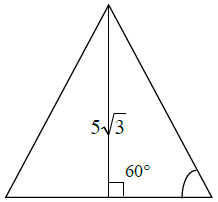
Observe o triângulo isóscele abaixo. A sua altura mede !$ 5 \sqrt{3} !$ cm e os ângulos da base medem 60°. A medida da base desse triângulo é:
Provas
Caderno Container