Foram encontradas 640 questões.
Uma circular é composta de:
I. Numeração.
II. Cláusula.
III. Assinatura.
Quais estão corretas?
Provas

Analise a figura abaixo:
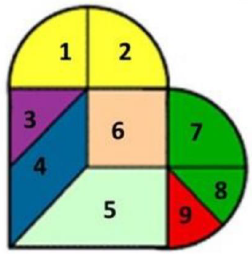
Considere que 6 é um quadrado, que 1 e 2 formam um semicírculo, assim como 7, 8 e 9, e também que 3, 4, 5 e 6 formam um quadrado. Se a área total de todas as figuras, isto é, de 1 até 9, vale A, então a área de 4 vale:
Provas
Se log(4) = a, é possível afirmar que
!$ log \left ( \dfrac{2}{3} \right )+log\left ( \dfrac{3}{4} \right )+log\left ( \dfrac{4}{5} \right )+...+log\left ( \dfrac{98}{99} \right )+log\left ( \dfrac{99}{100} \right ) !$
vale:
Provas
Disciplina: Inglês (Língua Inglesa)
Banca: FUNDATEC
Orgão: Pref. Tramandaí-RS
Tips for teaching an unforgettable online English class
Have you suddenly found yourself teaching online? You’re certainly not alone, and it can be hard to know where to start. The first step is to decide on a platform to deliver your classes, like Google Classroom, which is a free online learning management service for schools. It facilitates collaboration, file sharing and grading – and works well with all other Google platforms. In addition, there’s Zoom, a video conferencing and teaching platform which has exploded in popularity recently. You’ll need to administer your course, create materials, broadcast your class, interact with your students and grade their work, so you’ll need a computer or a professional tablet. Your students will also need a computer if they want to fully participate in your classes, but smartphones or tablets can be used when there’s no alternative. It’s important to dedicate a portion of your first class to helping students get to grips with the technology. Where possible, set aside a dedicated area in your home or office to teach from, and make sure you have all the visual aids and materials you need to hand. Additionally, ensure that nothing you don’t want your students to see is in view of the camera.
It can be difficult for students to adjust. Bring them into your lessons by starting all your classes with learning objectives, and at the end of the class, you can reflect on what you’ve done. Routine will help your students feel they’re in a safe learning environment. Also, make sure you mix study with energizing games or mini-breaks and have students share their ideas. Always confirm their understanding of the instructions. Classroom management might be easier online, however, students can talk to each other via chat box and get distracted with irrelevant online content. It’s a good idea to have students mute their microphones while you are delivering input and have them close all other windows on their computers. But be sure to let your students know why you are doing this, so they don’t feel like they are being forcibly silenced. They can ask you questions in the chat box.
It’s harder to engage online, so you can exaggerate your expressions and tone of voice slightly so they stay alert and interested (just don’t overdo it). Mix up your activities to keep things interesting, and remember that just because you’re online, it doesn’t mean students can’t collaborate. Many platforms allow you to put students in pairs or groups to work together in designated chat rooms. As a teacher, you can drop in and out of these rooms to monitor. In order to track your students’ progress – both during class and throughout their course, you might have students present their own ideas to the class using their webcams, and offer them progress tests through online forms and writing assignments. You could also test students using fun quiz software like Kahoot, or more formal online progress tests with Typeform’s test maker.
(Avaliable in: https://www.cambridgeenglish.org/blog/12-tips-for-teaching-an-online-english-class/ – text adapted specially for this test).
About the phrase “It’s harder to engage online” (l. 24), we can say that:
I. It’s a comparative structure.
II. “Harder” could be replaced by “most difficult” with no changes in meaning.
III. “Harder” follows the same spelling rules as “bigger”.
Which statements are correct?
Provas
Disciplina: Inglês (Língua Inglesa)
Banca: FUNDATEC
Orgão: Pref. Tramandaí-RS
Tips for teaching an unforgettable online English class
Have you suddenly found yourself teaching online? You’re certainly not alone, and it can be hard to know where to start. The first step is to decide on a platform to deliver your classes, like Google Classroom, which is a free online learning management service for schools. It facilitates collaboration, file sharing and grading – and works well with all other Google platforms. In addition, there’s Zoom, a video conferencing and teaching platform which has exploded in popularity recently. You’ll need to administer your course, create materials, broadcast your class, interact with your students and grade their work, so you’ll need a computer or a professional tablet. Your students will also need a computer if they want to fully participate in your classes, but smartphones or tablets can be used when there’s no alternative. It’s important to dedicate a portion of your first class to helping students get to grips with the technology. Where possible, set aside a dedicated area in your home or office to teach from, and make sure you have all the visual aids and materials you need to hand. Additionally, ensure that nothing you don’t want your students to see is in view of the camera.
It can be difficult for students to adjust. Bring them into your lessons by starting all your classes with learning objectives, and at the end of the class, you can reflect on what you’ve done. Routine will help your students feel they’re in a safe learning environment. Also, make sure you mix study with energizing games or mini-breaks and have students share their ideas. Always confirm their understanding of the instructions. Classroom management might be easier online, however, students can talk to each other via chat box and get distracted with irrelevant online content. It’s a good idea to have students mute their microphones while you are delivering input and have them close all other windows on their computers. But be sure to let your students know why you are doing this, so they don’t feel like they are being forcibly silenced. They can ask you questions in the chat box.
It’s harder to engage online, so you can exaggerate your expressions and tone of voice slightly so they stay alert and interested (just don’t overdo it). Mix up your activities to keep things interesting, and remember that just because you’re online, it doesn’t mean students can’t collaborate. Many platforms allow you to put students in pairs or groups to work together in designated chat rooms. As a teacher, you can drop in and out of these rooms to monitor. In order to track your students’ progress – both during class and throughout their course, you might have students present their own ideas to the class using their webcams, and offer them progress tests through online forms and writing assignments. You could also test students using fun quiz software like Kahoot, or more formal online progress tests with Typeform’s test maker.
(Avaliable in: https://www.cambridgeenglish.org/blog/12-tips-for-teaching-an-online-english-class/ – text adapted specially for this test).
Consider the meaning of the highlighted words in paragraph two in the context presented in the article, and match them, in order, to the idea they convey.
Provas
Disciplina: Inglês (Língua Inglesa)
Banca: FUNDATEC
Orgão: Pref. Tramandaí-RS
Tips for teaching an unforgettable online English class
Have you suddenly found yourself teaching online? You’re certainly not alone, and it can be hard to know where to start. The first step is to decide on a platform to deliver your classes, like Google Classroom, which is a free online learning management service for schools. It facilitates collaboration, file sharing and grading – and works well with all other Google platforms. In addition, there’s Zoom, a video conferencing and teaching platform which has exploded in popularity recently. You’ll need to administer your course, create materials, broadcast your class, interact with your students and grade their work, so you’ll need a computer or a professional tablet. Your students will also need a computer if they want to fully participate in your classes, but smartphones or tablets can be used when there’s no alternative. It’s important to dedicate a portion of your first class to helping students get to grips with the technology. Where possible, set aside a dedicated area in your home or office to teach from, and make sure you have all the visual aids and materials you need to hand. Additionally, ensure that nothing you don’t want your students to see is in view of the camera.
It can be difficult for students to adjust. Bring them into your lessons by starting all your classes with learning objectives, and at the end of the class, you can reflect on what you’ve done. Routine will help your students feel they’re in a safe learning environment. Also, make sure you mix study with energizing games or mini-breaks and have students share their ideas. Always confirm their understanding of the instructions. Classroom management might be easier online, however, students can talk to each other via chat box and get distracted with irrelevant online content. It’s a good idea to have students mute their microphones while you are delivering input and have them close all other windows on their computers. But be sure to let your students know why you are doing this, so they don’t feel like they are being forcibly silenced. They can ask you questions in the chat box.
It’s harder to engage online, so you can exaggerate your expressions and tone of voice slightly so they stay alert and interested (just don’t overdo it). Mix up your activities to keep things interesting, and remember that just because you’re online, it doesn’t mean students can’t collaborate. Many platforms allow you to put students in pairs or groups to work together in designated chat rooms. As a teacher, you can drop in and out of these rooms to monitor. In order to track your students’ progress – both during class and throughout their course, you might have students present their own ideas to the class using their webcams, and offer them progress tests through online forms and writing assignments. You could also test students using fun quiz software like Kahoot, or more formal online progress tests with Typeform’s test maker.
(Avaliable in: https://www.cambridgeenglish.org/blog/12-tips-for-teaching-an-online-english-class/ – text adapted specially for this test).
What is the verb tense of the underlined sentence in line 01?
Provas
Disciplina: Inglês (Língua Inglesa)
Banca: FUNDATEC
Orgão: Pref. Tramandaí-RS
Tips for teaching an unforgettable online English class
Have you suddenly found yourself teaching online? You’re certainly not alone, and it can be hard to know where to start. The first step is to decide on a platform to deliver your classes, like Google Classroom, which is a free online learning management service for schools. It facilitates collaboration, file sharing and grading – and works well with all other Google platforms. In addition, there’s Zoom, a video conferencing and teaching platform which has exploded in popularity recently. You’ll need to administer your course, create materials, broadcast your class, interact with your students and grade their work, so you’ll need a computer or a professional tablet. Your students will also need a computer if they want to fully participate in your classes, but smartphones or tablets can be used when there’s no alternative. It’s important to dedicate a portion of your first class to helping students get to grips with the technology. Where possible, set aside a dedicated area in your home or office to teach from, and make sure you have all the visual aids and materials you need to hand. Additionally, ensure that nothing you don’t want your students to see is in view of the camera.
It can be difficult for students to adjust. Bring them into your lessons by starting all your classes with learning objectives, and at the end of the class, you can reflect on what you’ve done. Routine will help your students feel they’re in a safe learning environment. Also, make sure you mix study with energizing games or mini-breaks and have students share their ideas. Always confirm their understanding of the instructions. Classroom management might be easier online, however, students can talk to each other via chat box and get distracted with irrelevant online content. It’s a good idea to have students mute their microphones while you are delivering input and have them close all other windows on their computers. But be sure to let your students know why you are doing this, so they don’t feel like they are being forcibly silenced. They can ask you questions in the chat box.
It’s harder to engage online, so you can exaggerate your expressions and tone of voice slightly so they stay alert and interested (just don’t overdo it). Mix up your activities to keep things interesting, and remember that just because you’re online, it doesn’t mean students can’t collaborate. Many platforms allow you to put students in pairs or groups to work together in designated chat rooms. As a teacher, you can drop in and out of these rooms to monitor. In order to track your students’ progress – both during class and throughout their course, you might have students present their own ideas to the class using their webcams, and offer them progress tests through online forms and writing assignments. You could also test students using fun quiz software like Kahoot, or more formal online progress tests with Typeform’s test maker.
(Avaliable in: https://www.cambridgeenglish.org/blog/12-tips-for-teaching-an-online-english-class/ – text adapted specially for this test).
Which topic is NOT mentioned in the text?
Provas
Disciplina: Inglês (Língua Inglesa)
Banca: FUNDATEC
Orgão: Pref. Tramandaí-RS
Tips for teaching an unforgettable online English class
Have you suddenly found yourself teaching online? You’re certainly not alone, and it can be hard to know where to start. The first step is to decide on a platform to deliver your classes, like Google Classroom, which is a free online learning management service for schools. It facilitates collaboration, file sharing and grading – and works well with all other Google platforms. In addition, there’s Zoom, a video conferencing and teaching platform which has exploded in popularity recently. You’ll need to administer your course, create materials, broadcast your class, interact with your students and grade their work, so you’ll need a computer or a professional tablet. Your students will also need a computer if they want to fully participate in your classes, but smartphones or tablets can be used when there’s no alternative. It’s important to dedicate a portion of your first class to helping students get to grips with the technology. Where possible, set aside a dedicated area in your home or office to teach from, and make sure you have all the visual aids and materials you need to hand. Additionally, ensure that nothing you don’t want your students to see is in view of the camera.
It can be difficult for students to adjust. Bring them into your lessons by starting all your classes with learning objectives, and at the end of the class, you can reflect on what you’ve done. Routine will help your students feel they’re in a safe learning environment. Also, make sure you mix study with energizing games or mini-breaks and have students share their ideas. Always confirm their understanding of the instructions. Classroom management might be easier online, however, students can talk to each other via chat box and get distracted with irrelevant online content. It’s a good idea to have students mute their microphones while you are delivering input and have them close all other windows on their computers. But be sure to let your students know why you are doing this, so they don’t feel like they are being forcibly silenced. They can ask you questions in the chat box.
It’s harder to engage online, so you can exaggerate your expressions and tone of voice slightly so they stay alert and interested (just don’t overdo it). Mix up your activities to keep things interesting, and remember that just because you’re online, it doesn’t mean students can’t collaborate. Many platforms allow you to put students in pairs or groups to work together in designated chat rooms. As a teacher, you can drop in and out of these rooms to monitor. In order to track your students’ progress – both during class and throughout their course, you might have students present their own ideas to the class using their webcams, and offer them progress tests through online forms and writing assignments. You could also test students using fun quiz software like Kahoot, or more formal online progress tests with Typeform’s test maker.
(Avaliable in: https://www.cambridgeenglish.org/blog/12-tips-for-teaching-an-online-english-class/ – text adapted specially for this test).
Considering the content of the text, which is the main question answered by the author?
Provas
O ser humano é, na linguagem de Aristóteles, um “animal político”. Ou, como se costuma afirmar na igreja dos pobres da América Latina: “Tudo é política, embora a política não seja tudo”. Portanto, essa relação da teologia com a “política” sistematizou movimentos religiosos que englobam vários pensamentos interpretativos de ensinamentos de Cristo, objetivando a libertação das injustiças e condições sociais, políticas e econômicas. Em outras palavras, baseada não apenas nas intepretações eclesiásticas, mas na realidade de pobreza e exclusão, consolidando um profundo propósito da relação entre fé, política e religião. Como afirma o teólogo Leonardo Boff, “a prática cristã pressupõe e depende de um compromisso que rompe um contexto existente de dominação”. Com base exclusivamente no que é exposto, é possível concluir que se trata do conceito de:
Provas
Na atualidade existe um reconhecimento de que os estudos sobre religião e religiosidade valorizam os fenômenos religiosos de forma diversificada. Isso significa reconhecer a vida cotidiana como religiosidade popular, sob formas de espiritualidade que fornecem elementos para construção de identidades; portanto, as experiências místicas não são domínio coletivo das igrejas organizadas e institucionais, pois muitos movimentos religiosos vão além do que as instituições pregam, procurando repensar os papéis de gênero, das opções sexuais. Ao considerar o contexto apresentado em um ambiente de sala de aula, podemos compreender que existe uma valorização:
Provas
Caderno Container